Showing posts with label Tables. Show all posts

Friday, August 24, 2012

SQL Server: Why We Should Avoid NOLOCK Table Hint in DELETE/UPDATE Queries

Recently, I was asked to review, already written stored procedures for optimization purpose. During this review process I have found that a group of developers is regularly committing a big mistake. This group of developers believes that table hint NOLOCK is used to execute queries quickly, as this hint will avoid placing any lock on target table records and it can you used in any query. Even they have applied this NOLOCK in DML statements.
WRONG
First thing, NOLOCK hint means, it will not take care of any lock (instead of placing lock). It will return data, that could be dirty (NOT YET COMMITTEED by other transactions). We can use this table hint to get results quickly when we are dead sure that dirty data is TOTALLY bearable.
In DELETE/UPDATE queries it should be totally avoided as it can produce junk results. Let’s prove.
In following example, we need to correct discount column of SalesOrderDetail, but according to discount provided in lookup table of SpecialOffer. Before we execute our update statement (Statement #2 in Transaction# 2), someone has accidently changed SpecialOffer, but good thing is that, he has not committed these changes yet. But as we have placed NOLOCK hint in our Statement #2 in Transaction# 2, it will change data according to dirty data, though, later on transaction#1 is rolledback.


Tuesday, July 31, 2012

SQL Server : Tables Relationship Diagram Using TSQL Script


How do you create relationship diagram/report between tables of a given database ? Mostly people use Database Diagram for this purpose, but this can be achieved by TSQL script as following.

 
-- Tables Relationship Script
-- Script By: Syed Muhammad Yasir for http://connectsql.blogspot.com
-- Updated August 1, 2012
 

SELECT  CASE WHEN a.parent_object_id IS NULL
THEN parent.name + '-1--*-' + child.name
ELSE parent.name + '-1--1-' + child.name
END AS TablesWithRelations
FROM    ( SELECT DISTINCT
parent_object_id, referenced_object_id
FROM      sys.foreign_keys ) fk
LEFT JOIN ( SELECT DISTINCT
fkindexes.parent_object_id,
fkindexes.referenced_object_id
FROM    ( SELECT    fk.parent_object_id,
fk.referenced_object_id,
ixcolumns.index_id, COUNT(*) cindexes
FROM      ( SELECT    object_id,
            parent_object_id,
            referenced_object_id
  FROM      ( SELECT    row_number() OVER ( PARTITION BY parent_object_id, referenced_object_id
ORDER BY object_id ) rid,
              object_id, parent_object_id, referenced_object_id
              FROM      sys.foreign_keys ) fk
  WHERE     rid = 1 ) fk
JOIN sys.foreign_key_columns fkc ON fkc.constraint_object_id = fk.object_id
JOIN sys.index_columns ixcolumns ON ixcolumns.object_id = fkc.parent_object_id
                                    AND ixcolumns.column_id = fkc.parent_column_id
JOIN sys.indexes ix ON ix.object_id = ixcolumns.object_id
                       AND ix.index_id = ixcolumns.index_id
WHERE     ix.is_unique = 1
GROUP BY  fk.parent_object_id,
fk.referenced_object_id,
ixcolumns.index_id ) fkindexes
JOIN ( SELECT   fk.parent_object_id,
    ixcolumns.index_id,
    COUNT(*) cindexestotal
FROM     ( SELECT DISTINCT
                parent_object_id
      FROM      sys.foreign_keys ) fk
    JOIN sys.index_columns ixcolumns ON ixcolumns.object_id = fk.parent_object_id
GROUP BY fk.parent_object_id,
    ixcolumns.index_id ) totalindexes ON totalindexes.parent_object_id = fkindexes.parent_object_id
                                         AND totalindexes.index_id = fkindexes.index_id

WHERE   cindexestotal - cindexes = 0 ) a ON a.parent_object_id = fk.parent_object_id
                        AND a.referenced_object_id = fk.referenced_object_id
JOIN sys.tables child ON fk.parent_object_id = child.object_id
JOIN sys.tables parent ON fk.referenced_object_id = parent.object_id
ORDER BY TablesWithRelations

Wednesday, March 30, 2011

SQL Server: Small Tables’ Clustered Indexes Fragmentation

Recently, I have received a mail from my friend who was angry that, the defragmentation script that I have mentioned in my post Simple Method to Resolve All Indexes Fragmentation is not working properly, even he executed said script multiple times. sys.dm_db_index_physical_stats is still showing few tables with high fragmentation.
On further inquiry I found that, said tables are from setup schema and have small number of rows. And I just replied him that I am HAPPY that script is not working for these tables.
Actually, when we create a table and start inserting rows, SQL Server  initially allocates pages from mixed extents until it has enough data to deserve a full extent, then SQL Server will allocate a uniform extent to it. Similarly if you build an index on a table that have fewer then eight pages SQL Server will allocate pages from mixed extents for storing the index data. And if these mixed extents are not located side by side then database management view sys.dm_db_index_physical_stats will show HIGH external fragmentation. So no need to worry about fermentation of clustered index of small tables which have fewer then eight pages.

Thursday, January 27, 2011

SQL Server: Table Variables Are Created In Memory Or In Tempdb


In response to the earlier post How to Create Different Type of Tables a reader asked a question that


“Is it true that temp table are created in Tempdb but Table variables are created only in memory and because of this, table variables are more efficient as compared to temp tables”


My answer is that, it’s just a misconception that table variables are created in memory and truth is that both temporary tables and table variables are created in tempdb. Pinal Dave and Ken Simmons already proved it so well. So I will suggest reading these posts for more clarifications.

SQL SERVER – Difference TempTable and Table Variable – TempTable in Memory a Myth By Pinal Dave

Yes, Table Variables and Temp Tables both use the tempdb By Ken Simmons

Friday, January 21, 2011

SQL Server: How to Get Physical Path of Tables and Indexes


When database consists of multiple data files and objects (tables/indexes) are dispersed on these multiple data files. Common requirement is to get a list of objects (tables, indexes) along with their physical path.  Here is a simple query to accomplish this task.
SELECT  'table_name' = OBJECT_NAME(i.id),
        i.indid,
        'index_name' = i.name,
        i.groupid,
        'filegroup' = f.name,
        'file_name' = d.physical_name,
        'dataspace' = s.name
FROM    sys.sysindexes i,
        sys.filegroups f,
        sys.database_files d,
        sys.data_spaces s
WHERE   OBJECTPROPERTY(i.id, 'IsUserTable') = 1
        AND f.data_space_id = i.groupid
        AND f.data_space_id = d.data_space_id
        AND f.data_space_id = s.data_space_id
ORDER BY f.name,
        OBJECT_NAME(i.id),
        groupid

Thursday, January 20, 2011

SQL Server: How to Insert Stored Procedure Result Set in a Table

Tables can be populated with data from result set of stored procedure. Method can be applied to regular, temporary and global temporary tables but table variables can not be populated in this fashion.

INSERT INTO [YourTableName](CommaSeparatedColumnsName)
 EXECUTE YourStoredProcedureNameHere CommaSeparatedParameterValues

 Note: Number of input and output columns, as well as their datatypes must be same.

Wednesday, January 19, 2011

SQL Server: Function Based Check Constraint


Check constraints are used to apply business logic. These checks can easily and effectively be managed on application side. But if somehow you need to apply complex business logic as check constraints, you can use user defined functions for this purpose. Let’s create a function first to restrict any address entry from Afghanistan (apology to Taliban ;) )
USE AdventureWorks
CREATE FUNCTION dbo.fnc_RestrictedAddress
(
      @Address NVARCHAR(60)
)    
RETURNS BIT

AS
 BEGIN
 DECLARE @ResultBit BIT = 1

 IF @Address LIKE '%Afghanistan%'
      SELECT @ResultBit = 0

RETURN      @ResultBit

 END

Open table in design view, right click anywhere on table in design view, click “CHECK CONSTRAINTS” and click "ADD" button. Move to expression part and edit it as given in screen shot.

Or you can edit desired table to apply check constraint with following t-sql.
ALTER TABLE [Person].[Address]  WITH NOCHECK ADD  CONSTRAINT [CK_Address] CHECK  (([dbo].[fnc_RestrictedAddress]([AddressLine1])=(1)))

Let’s check out constraint efficiency by inserting new record in “Address” table
USE AdventureWorks
INSERT INTO [AdventureWorks].[Person].[Address]
           ([AddressLine1]
           ,[AddressLine2]
           ,[City]
           ,[StateProvinceID]
           ,[PostalCode]
           ,[rowguid]
           ,[ModifiedDate])
     VALUES
           ('Zahir Shah Road, Kabul, Afghanistan'
           ,'abc'
           ,'Kabul'
           ,'1'
           ,'51000'
           ,NEWID()
           ,GETDATE())
GO

Msg 547, Level 16, State 0, Line 1
The INSERT statement conflicted with the CHECK constraint "CK_Address". The conflict occurred in database "AdventureWorks", table "Person.Address", column 'AddressLine1'.
The statement has been terminated.

Friday, January 7, 2011

Sql Server: Quickest Way to Create Tables Relationship

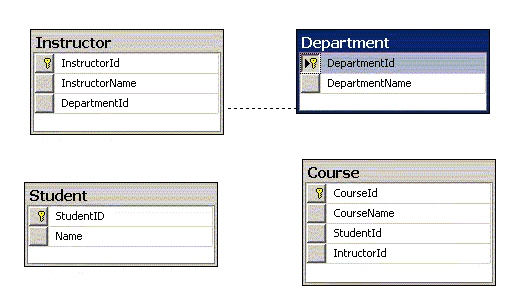
Creating relationship between tables is not a big task, but I have noticed that many of us (especially I) want to create these relation in minimum time. We can create relations between tables through T-Sql (most time consuming method) or we can complete this task through graphical design view of table in Sql Server Management Studio. But I like to create these relations with following method.
1.  Create table through design view in SSMS (Quick way to create table). In our example we have created following four tables.

2.       Create a database diagram by following method
a.  Right click on “Database Diagram” and click “New Database Diagram”
b.      Add your desired tables. In our case we will add four tables
3.  Click on primary key column and drag it to related table. Verify columns to join in pop-up window and press OK for both pop-up windows. Repeat the process with all table and you are done.

4.       Cltr + S  or click on save button to save diagram and table relations.

Monday, December 6, 2010

Sql Server Internal: Negative Side Effects of Altering Tables

What do you think, what happens when you alter your database table in Sql Server. Most of the time Sql Server just make changes in meta data and NO physical changes are made. It commonly happens when you:
o   Drop a column
o   Add a new column and assumes NULL as the new value for all rows
o   Increase length of  a variable-length column
o   Change a  non-nullable column to allow NULLs
Due to this behavior few major negative side effects can be observed.
1.       When a fixed length column (i.e. column with data type CHAR, NCHAR, INT, SMALL INT etc) is altered to increase its length. The old column is not actually replaced. Rather, a new column is added to the table, and DBCC PAGE shows you that the old data is still there.
2.       When you try to decrease length of fixed length column. It just make changes in meta data, that column values will be according to new mentioned length and NO PHYSICAL change occur. It means size is never deceased. For example if you want to change CHAR(15) column to CHAR(10). Sql Server will never decrease its length to 10. Column length will remain 15 physically and its only meta data which will bind you to use only 10 character length.
3.       One more drawback is, when you drop a column from your table. NO such action is performed (Column is not dropped physically) and only meta data is changed, so in future you can’t see or use it. No space is released and column still exists.

SOLUTION:
               Make your desired changes through ALTER TABLE and then reclaim table space by recreating table or just rebuild clustered index.