Thursday, November 29, 2012
Sunday, October 21, 2012
SQL Server: Placing Alert for Compatibility Level Change in SQL 2005
@cmptlvl60 = 65,
@cmptlvl60 = 70,
@cmptlvl60 = 80,
@cmptlvl60 = 90,
+ CONVERT(VARCHAR,SYSTEM_USER)
+' trying to change Compatibility Level of Database ' + CONVERT(VARCHAR,@dbname)
+ ' at '
+ CAST(GETDATE() AS VARCHAR(50))
EXEC msdb.dbo.sp_send_dbmail @recipients='essmess@gmail.com;', --Change Email Address Accordingly
@subject = 'Compatibility Level Change Alter',
@profile_name = 'DBTeam', --Change DB mail Profile Accordingly
@body = @bodyText,
@body_format = 'TEXT' ;
Monday, July 23, 2012
SQL Server Scripts: Get All Nested Stored Procedures List (Procedures with dependent Procedures)
Tuesday, July 10, 2012
SQL Server: How Local Variables Can Reduce Query Performance
Create a new table and insert dummy rows.
CREATE TABLE TempTable
(tempID UNIQUEIDENTIFIER,tempMonth INT, tempDateTime DATETIME )
GO
GO 100000 -- (EXECUTE THIS BATCH 100000 TIME)
([tempDateTime] ASC)
INCLUDE ( [tempID]) WITH ( ALLOW_ROW_LOCKS = ON, ALLOW_PAGE_LOCKS = ON) ON [PRIMARY]
GO
Now let’s execute a simple query with hard coded values in WHERE clause
SELECT * FROM TempTable
WHERE tempDateTime > '2012-07-10 03:18:01.640'
-------------------------------------------------------------------------------------------
Table 'TempTable'. Scan count 1, logical reads 80, physical reads 0, read-ahead reads 0, lob logical reads 0, lob physical reads 0, lob read-ahead reads 0.
SET @RequiredDate = '2012-07-10 03:18:01.640'
SELECT * FROM TempTable
WHERE tempDateTime > @RequiredDate
------------------------------------------------------------------------------------------
Table 'TempTable'. Scan count 1, logical reads 481, physical reads 0, read-ahead reads 0, lob logical reads 0, lob physical reads 0, lob read-ahead reads 0.

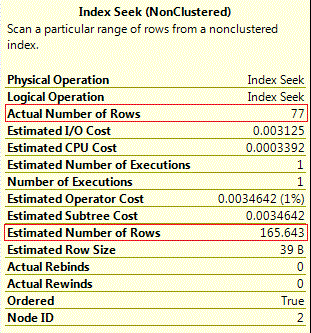
In our case of inequality operator in query, query optimizer used a simple formula of 30% of total rows.
SET @RequiredDate = '2012-07-10 03:18:01.640'
SELECT * FROM TempTable
WHERE tempDateTime = @RequiredDate
Estimated Rows = Density * Total Number = 0.0007358352 * 100000 = 73.5835
Wednesday, July 4, 2012
SQL Server: Object Validation Error by Estimated Plan While Actual Plan Working Fine
BEGIN
IF 1 = 2
SELECT * FROM NoTable -- NoTable doesn't exists
ELSE
SELECT 'ESLE'
END
GO
Friday, June 3, 2011
SQL Server: Automatic Query Execution at Every Instance Startup
Wednesday, March 9, 2011
SQL Server: How to Avoid Big Single Error Log File on Production Servers
Tuesday, December 28, 2010
Sql Server:Performance Counter to Count Stored Procedure Re-compilations
- Use of a WITH RECOMPILE clause in the CREATE PROCEDURE or EXECUTE statement.
- Schema changes to any of the referenced objects, including adding or dropping constraints, defaults, or rules.
- Running sp_recompile for a table referenced by the procedure.
- Restoring the database containing the procedure or any of the objects the procedure references (if you are performing cross-database operations).
- Sufficient server activity causing the plan to be aged out of cache
- A sufficient percentage of data changes in a table that is referenced by the stored procedure.
- The procedure interleaves Data Definition Language (DDL) and Data Manipulation Language (DML) operations.
Monday, August 3, 2009
Why should we use Store Procedure instead of Ad hoc queries
Stored procedure is a set of Structured Query Language statements with an assigned name which are stored with in the database in compiled form so that it can be used by a number of programs.
Ad hoc queries are normally written on application side and are meant to be used for once only and are never saved to run again.
At the beginning developers who are not good at database side, like to use ad hoc queries for fetching and to make changes in required data. These ad hoc queries can kill performance and some time it is hard to control complex logics through these ad hoc queries. Store procedures are the best choice to accomplish these data processes. These are helpful in following regards.
- Reduce Network Traffic
Excessive network traffic is a big performance killer. Frequent trips to database server from client application (because of ad hoc queries) may be a cause of this excessive network traffic. Store Procedures helps you to reduce such network traffic by holding group of statements and returning required result with a single call.
Avoid lengthy transactions in store procedures to prevent lock contention problems.
- Database Privileges
Users can be restricted from having access to read/write to tables directly in database by using store procedures. Only developer of store procedure require specific privileges, while creating a store procedure but to execute these store procedures client of application only need execute privileges.
- Code Security
Sql Injections, which uses AND or Or to append commands on to a valid input parameter can be defended by using store procedures, but If you still have a string in your application with the store procedure name and concatenated parameters from user input to that string in your code, you are still on risk.
- Execution Plan Re-use
Store procedures are compiled once and resultant execution plan are utilized for future executions. This results in tremendous performance boosts when store procedures are called repeatedly.
- Efficient Re-use of Code
Commonly used store procedures can be effectively used for different projects.
For example, create a store procedure which returns amount in words against integer input. (INPUT= 1542214, OUTPUT= 1.5 Million, Forty Two Thousand, Two Hundred and Fourteen). Store procedure like this, can be used in any application.
- Single Point of Maintenance
Change in business rules defined for a project, over a time is normal. If such business rules are controlled with in store procedures rather then application, it is easy to make changes in database and NO need to recompile your application code.