It is hard to imagine not backing up the production databases periodically. This facilitates recovery from accidental data deletion or complete database corruption. BUT only when you excellently know which type of Backup or combination of Backups you really need.
This video focus on all four types of backups in Microsoft SQL Server.
Recently,
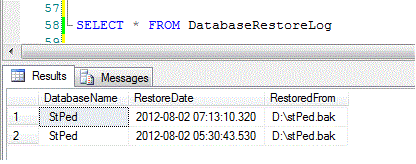
one of our DBA restored a database on live server, but with old backup
accidently. Later on, we have found that it was hard to detect which backup was
actually restored. To check, which backups we have created for database we have
a perfect script, which you can find over here
and here.
But unfortunately no such script found anywhere to get restore history.
Here
is a script, we have used to create a job, which will fetch restore related log
entries from SQL Server Log and will archive it to a user created history table.
One more daily base SQL Server log message reported
from one of our production server was
I/O
is frozen on database model. No user action is required. However, if I/O is not
resumed promptly, you could cancel the backup.
AND
I/O
was resumed on database DATABASENAME. No user action is required.
First
thing to note is that it’s just a message and not an error and no user action
is required. On investigation for said production server, I found that our
System Administrators has enabled SQL Server backup through VSS (Volume Shadow
Copy Services) and this process actually freeze I/O temporarily to take shadow
copy and release it back once process is complete. How it works read here.
This morning in log report of one of our production server
I found an unusual
error.
DeviceIoControl failed, error
21
DeviceIOControl is a function which sends
code to your disk drivers to perform read or writes functions and error 21
clearly indicates that device which we have specified to perform a job is not
ready.
This
happened because, on our production server, we had configured a backup job
which takes daily full backup to a removable device and unfortunately it was
removed by our systems department, which caused this error.
Yes you can restore a backup file which is taken from SQL
Server Enterprise Edition to Standard Edition BUT if source database is not
using Enterprise Edition Specific Features. Like partition functions in our case.
This happened to one of my junior, when he was restoring a
database (on SQL Server 2008 R2 Standard Edition) from full backup, which was
taken from SQL Server 2008 R2 Enterprise edition. 6 GB database backup file took
more than half an hour to restore and after showing 100 percent completion, on
starting database it returned FAILURE ERROR.
Database
'SQL2008R2_Ent_PartitionFunction' cannot be started in this edition of SQL
Server because it contains a partition function 'SSF_PF_Right'. Only Enterprise
edition of SQL Server supports partitioning.
Database
'SQL2008R2_Ent_PartitionFunction' cannot be started because some of the
database functionality is not available in the current edition of SQL Server.
(Microsoft SQL Server, Error: 905)
Basically restore process is completed successfully and you can see
database name in list and its files on required location but in inaccessible
mode.
I think Microsoft should improve this process and these prerequisites
should be checked first.
Problem occurs when we try to
restore a database from backup set, but using MOVE option and when you provide
wrong logical name of file in MOVE section of RESTORE script. To avoid this problem, first, one must
verify original logical names of files by using following RESTOREFILELISTONLY.
Now if somehow I use wrong logical file name, it will
return error.
Correct the logical names, as per RESTOREFILELISTONLY output and it will work fine.
Up to SQL
Server 2008 R2 (10.5), we were unable to change default path (easily) for “Backup
files”, though it was possible after making some changes in registry at path. “HKEY_LOCAL_MACHINE\SOFTWARE\
Microsoft\Microsoft SQL Server\MSSQL.1\ MSSQLServer\BackupDirectory”
Note: For SQL Server 2005 its MSSQL.1, for SQL Server 2008, its MSSQL10 and for SQL Server 2008 R2 its MSSQL10_50
Thanks to
SQL Server 2011 (Code name DENALI), as now we can change this default path for backup files
to our required one by just opening server properties page and on “Database
Settings” tab.
Try Taking a
backup from SSMS and now you can find that it has already pointing toward you
given path.
------------------------------------------------------------------------------------ Read More about SQL Server 2012
(Code Name: Denali)
Backup
process in SQL Server Denali is quite same to previous versions. But there are
few changes in restore dialog box.
Restore dialog box is
now divided into three tabs instead of two. General tab is almost same to
existing versions but options tab is further divided into “options” and
“files” tabs.
A good thing about
new restore page is “Backup Timeline”. Backup Timeline dialog box is
useful to graphically locate and specify backups to restore a database to
a point-in-time.For detail
There are several ways to create backup for a single table in SQL Server database. In SQL Server 2008, now you can create insert statements for selected tables. Beside this Export wizard is commonly used to create a flat file backup for a single table. Both methods are reliable but still time consuming. And when I searched for quickest method to take backup of a single table I found following code by SQL Expert Fred.
USE AdventureWorks
GO
DECLARE @table VARCHAR(128),
@file VARCHAR(255),
@cmd VARCHAR(512)
-- If i need to create CSV file Product table then
SET @cmd = 'bcp "AdventureWorks.' + @table + '" out "' + @file + '" -S. -T -c -t,'
EXECmaster..xp_cmdshell @cmd
Code basically uses BCP to create a CSV file for a given table. I can create a template of above code, and then just load, change values and execute. So simple but still it has a drawback. It creates a CSV file for all rows but WITHOUT column header row. Now how can I import this table later on, without column header row?
Then I found quickest and simplest way to achieve this goal. Simply type select * query but before execution
• Click on Tools --- > options and change values for Query Result Output Format and Custom Delimiter (I preferred pipe sign “|”)
• Press Ctrl+Shift+F buttons, so it can save result to file.
SELECT * FROM Production.Product
• On execution, provide file name and your desired path and it’s done
Don’t worry about newly created file extension. When need to import just select it from All Files (*,*).
Recently one of my colleague at work informed that on development database he executed a DELETE query but forgot to place WHERE clause and committed the transaction. Though the database server was a development server but still they don’t want to miss any entry, that’s why they don’t want to restore database from full backup, which was taken three days ago.
Thanks to point in time recovery option which helped us to restore our database without losing a single record to a specific time.
For point in time recovery your database
·Must be in FULL RECOVERY MODEL
·Must have a valid FULL BACKUP
What is current recovery model of your database?
SELECT name,recovery_model_desc
FROMsys.databases
You can change recovery model from SSMS by right click on your desired database >>click properties -- > on left, select options and change recovery model. Or you can do it with following tsql.
(After problem has occurred and you need a point in time recovery)
1.You must check that your database is in full recovery model and valid FULL backup is already taken. Create a transaction log backup by using graphical interface or just executing following tsql.
NOFORMAT,NOINIT, NAME =N'AdventureWorks-Transaction Log Backup',SKIP,
NOREWIND,NOUNLOAD,STATS= 10
2.Create a full backup of database for safe side.
3.Restore your full database backup BUT with “RESTORE WITH NORECROVERY” option
4.Now restore your currently created Transaction Log Backup, with “WITH RECOVERY” option, BUT up to your desired time. In our example we will restore our Transaction Log file up to 3:30PM.
RESTORELOG [AdventureWorks]
FROMDISK='E:\EmergencyLogBackup.trn'
WITHRECOVERY,
STOPAT='Jan 03, 2011 03:30:00 PM'
If you already have transaction log backup/s taken between your point of problem and Full Back. Restore your full back and then restore rest of your intermediate backups (Differential or Log) BUT all with “RESTORE WITH NORECROVERY” option. At the end restore your transaction log backup which you have created after PROBLEM OCCURRED, with “WITH RECOVERY” option.
Aasim Abdullah is working as SQL Server DBA with CureMD (www.curemd.com) based in NY, USA. He has been working with SQL Server since 2007 (Version 2005) and has used it in many projects as a developer, administrator, database designer. Aasim's primary interest is SQL Server performance tuning. If he finds the time, he like to sketch faces with graphite penciles.