Showing posts with label Index. Show all posts
Thursday, November 29, 2012
Tuesday, July 10, 2012
SQL Server: How Local Variables Can Reduce Query Performance
It’s
a common practice by database developers to use local variables in stored
procedures and scripts to place filter on basis of these local variables. YES,
these local variables can slowdown your queries. Let’s prove it.
Create a new table and insert dummy rows.
CREATE TABLE TempTable
(tempID UNIQUEIDENTIFIER,tempMonth INT, tempDateTime DATETIME )
GO
GO 100000 -- (EXECUTE THIS BATCH 100000 TIME)
([tempDateTime] ASC)
INCLUDE ( [tempID]) WITH ( ALLOW_ROW_LOCKS = ON, ALLOW_PAGE_LOCKS = ON) ON [PRIMARY]
GO
Now let’s execute a simple query with hard coded values in WHERE clause
SELECT * FROM TempTable
WHERE tempDateTime > '2012-07-10 03:18:01.640'
-------------------------------------------------------------------------------------------
Table 'TempTable'. Scan count 1, logical reads 80, physical reads 0, read-ahead reads 0, lob logical reads 0, lob physical reads 0, lob read-ahead reads 0.
SET @RequiredDate = '2012-07-10 03:18:01.640'
SELECT * FROM TempTable
WHERE tempDateTime > @RequiredDate
------------------------------------------------------------------------------------------
Table 'TempTable'. Scan count 1, logical reads 481, physical reads 0, read-ahead reads 0, lob logical reads 0, lob physical reads 0, lob read-ahead reads 0.
In our case of inequality operator in query, query optimizer used a simple formula of 30% of total rows.
In Case of Equality Operator:
DECLARE
@RequiredDate DATETIME
SET @RequiredDate = '2012-07-10 03:18:01.640'
SELECT * FROM TempTable
WHERE tempDateTime = @RequiredDate
Estimated Rows = Density * Total Number = 0.0007358352 * 100000 = 73.5835
Create a new table and insert dummy rows.
USE
AdventureWorks
GO CREATE TABLE TempTable
(tempID UNIQUEIDENTIFIER,tempMonth INT, tempDateTime DATETIME )
GO
INSERT INTO TempTable (tempID, tempMonth, tempDateTime)
SELECT NEWID(),(CAST(100000*RAND() AS INT) % 12) + 1 ,GETDATE()GO 100000 -- (EXECUTE THIS BATCH 100000 TIME)
-- Create an index to support our
query
CREATE NONCLUSTERED INDEX
[IX_tempDateTime] ON [dbo].[TempTable] ([tempDateTime] ASC)
INCLUDE ( [tempID]) WITH ( ALLOW_ROW_LOCKS = ON, ALLOW_PAGE_LOCKS = ON) ON [PRIMARY]
GO
Now let’s execute a simple query with hard coded values in WHERE clause
SET STATISTICS IO ON
GOSELECT * FROM TempTable
WHERE tempDateTime > '2012-07-10 03:18:01.640'
-------------------------------------------------------------------------------------------
Table 'TempTable'. Scan count 1, logical reads 80, physical reads 0, read-ahead reads 0, lob logical reads 0, lob physical reads 0, lob read-ahead reads 0.
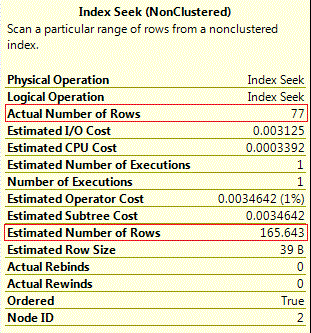
Check
out its execution plan and index seeks properties. You can find that estimated
rows are double to actual rows but that’s not a big difference to affect
execution plan and resultantly optimizer has selected a proper plan to execute
this query.
Query
optimizer has estimated number of rows from its base statistics histogram
i.e. EQ_ROWS + AVG_RANGE_ROWS (77 + 88.64286)
DBCC SHOW_STATISTICS ('dbo.TempTable', IX_tempDateTime)
Now,
let’s modify our SELECT query and use local variable and execute it. You will
find that query optimizer has selected a different plan this time, a more
costly plan. WHY ??
DECLARE
@RequiredDate DATETIMESET @RequiredDate = '2012-07-10 03:18:01.640'
SELECT * FROM TempTable
WHERE tempDateTime > @RequiredDate
------------------------------------------------------------------------------------------
Table 'TempTable'. Scan count 1, logical reads 481, physical reads 0, read-ahead reads 0, lob logical reads 0, lob physical reads 0, lob read-ahead reads 0.

Huge
difference of estimated and actual number of rows clearly indicating that query
optimizer was unable to proprly estimate number of rows and with this wrong
estimation, it has selected a more costly execution plan. Basically Query Optimizer
does not know the value of local variable at the time of optimization and
resultantly can’t use histogram of statistics. It behaves differently with
inequality and equality operators.
In
Case of Inequality Operator:In our case of inequality operator in query, query optimizer used a simple formula of 30% of total rows.
Estimated Rows =(Total Rows * 30)/100
= (100000*30)/100 = 30000
SET @RequiredDate = '2012-07-10 03:18:01.640'
SELECT * FROM TempTable
WHERE tempDateTime = @RequiredDate
If
equality operator is used with local variables, query optimizer gets estimated
rows figure from a different formula i.e.
Density * Total Number of Table Rows. Execute following query
to get density value.
DBCC SHOW_STATISTICS
('dbo.TempTable', IX_tempDateTime)
All Density = 0.0007358352
Total Number of Rows in Table =
100000Estimated Rows = Density * Total Number = 0.0007358352 * 100000 = 73.5835
Drop table when not required
DROP TABLE
TempTableThursday, June 7, 2012
SQL Server: Script to Fix ALLOW_PAGE_LOCKS Option for All indexes on All Databases
Recently
we have found that our index defragmentation
job is failing on a production server, due to REORGANIZE failure of one of our index. SQL Server was
unable to REORGANIZE this index because mistakenly we have an index with the ALLOW_PAGE_LOCKS options set to OFF
What
is Page Lock Option?
According
to BOL, If ALLOW_PAGE_LOCKS option is set to ON, it means Page locks are
allowed when accessing the index. The Database Engine determines when page
locks are used.
If ALLOW_PAGE_LOCKS option is set to off following query will return an error.
ALTER INDEX IX_Address_AddressLine1_AddressLine2_City_StateProvinceID_PostalCode
ON Person.Address REORGANIZE
The index "IX_Address_AddressLine1_AddressLine2_City_StateProvinceID_PostalCode" (partition 1) on table "Address" cannot be reorganized because page level locking is disabled.
You can correct it by simply
updating ALLOW_PAGE_LOCKS option to ON with the help of following query
ALTER INDEX
IX_Address_AddressLine1_AddressLine2_City_StateProvinceID_PostalCode ON Person.Address
SET (ALLOW_PAGE_LOCKS = ON);
To make sure to avoid this problem in futur for all datbases on a instance, Amna Asif has suggested following simple but efficient script to detect indexes with ALLOW_PAGE_LOCKS option set to OFF and automatically fix this problem for all of your databases on an instance.
/***********************************
Script By: Amna
AsifPurpose : To fix ALLOW_PAGE_LOCKS option on
all indexes of all databases on a particular instance
***********************************/
USE MASTER
GO
SET QUOTED_IDENTIFIER ON
GO
SET ARITHABORT ON
GO
DECLARE @DBName NVARCHAR(255)
DECLARE
@IndexCount intDECLARE @UpdateIndexQuery Varchar(500)
--- Table variable to hold intermediate result set
DECLARE @IndexsInfo TABLE
(
RowNo int identity(1,1),
DatabaseName varchar(100),
TableName varchar(100),
IndexName varchar(100)
)
--- Cursor to work on each changeable index of each db on an instance
DECLARE DatabaseList CURSOR
FOR
SELECT Name
FROM sys.databases
WHERE state_desc = 'ONLINE'
AND is_read_only = 0
ORDER BY name
OPEN DatabaseList
FETCH NEXT FROM DatabaseList INTO @DBName
WHILE @@FETCH_STATUS = 0
BEGIN
INSERT INTO @IndexsInfo (DatabaseName,TableName,IndexName)
EXEC( ' SELECT '''+@DBName+''' AS DatabaseName,TABL.NAME AS TableName,indx.NAME AS IndexName
FROM '+@DBName+'.SYS.INDEXES indx
LEFT OUTER JOIN '+@DBName+'.SYS.TABLES TABL ON indx.[OBJECT_ID]=TABL.[OBJECT_ID]
WHERE ALLOW_PAGE_LOCKS = 0 -- where page lock option is not selected
AND indx.name NOT LIKE ''QUEUE%'' ' -- we need only user defined indices
)
FETCH NEXT FROM DatabaseList INTO @DBName
END
CLOSE DatabaseList
DEALLOCATE DatabaseList
-----Update allow_page_locks option for those indexes where we need
SET @IndexCount=(SELECT MAX(RowNo) FROM @IndexsInfo )
WHILE @IndexCount >0
BEGIN
SET @UpdateIndexQuery=( SELECT ' ALTER INDEX '+ IndexsInfo.IndexName +' ON ['+
IndexsInfo.DatabaseName+'].dbo.['+IndexsInfo.TableName+']
SET (
ALLOW_PAGE_LOCKS = ON
) ; '
FROM @IndexsInfo AS IndexsInfo
WHERE IndexsInfo.RowNo=@IndexCount)
EXEC(@UpdateIndexQuery)
SET @IndexCount=@IndexCount-1
END
Wednesday, November 16, 2011
SQL Server 2012: A New More Flexible Create Index Dialog box
With every new version SQL Server is becoming more
power full yet more users friendly. Today, while creating index on SQL Server
2012, I have found that Index Creation Dialog box is become more easy to use.
In prior versions, more irritating thing for me (at
least), was naming a non-clustered index. Now dialog box suggests you more
meaningful name. Secondly dialog box contains two tabs to add key columns and
include columns.
In prior versions, a common error which I have always faced is that key column can’t be listed as include column.
Now in SQL Server 2012, Index Create Dialog box will
automatically disable check boxes for those columns which are already added as
key columns. Similarly, if a column is already added as include column it will
become disable on key column selection tab.
Remaining options are almost same to SQL Server R2, while COMPRESSION option is removed.
------------------------------------------------------------------------------------
Read More about SQL Server 2012 (Code Name: Denali)
------------------------------------------------------------------------------------
Read More about SQL Server 2012 (Code Name: Denali)
· Introducing New Edition "Business Intelligence"
· Changing Backup Files Default Path is More Easy Now
· New Backup/Restore Options
· CTP 3 Product Guide Released
· TRY_CONVERT(), a Good Addition
· Table Partition Limit Enhancement
· Format(), a Most Wanted Function
· Get Date/Time from Parts
· New Function to Get Last Date of Month
· IIF Logical Function
Tuesday, May 10, 2011
SQL Server: Short Code Doesn’t Mean Smart Code
Recently a blog reader shared an interesting thing. This mail was basically in response to my early post Why to Avoid TRIM functions in WHERE and JOIN clauses, where we have discussed, that why we should avoid functions (user defined or system) in where clause columns, because these functions in WHERE, JOIN and GROUP clauses mislead query optimizer for proper index selection and ultimately results in poor query performance.
Blog reader asked that he tried to remove functions from WHERE clause of all the queries but few queries where date was involve, was hard to correct and after asking at some forum he got a solution and now his code is shorter and quicker.
Actual query was something like as following:
Use AdventureWorks
Go
DECLARE @FindDate DATETIME
SET @FindDate = '2005/09/12 12:00:00'
SELECT *
FROM Purchasing.PurchaseOrderDetail
WHERE CAST(CONVERT(VARCHAR(30), ModifiedDate, 101) AS DATETIME) = CAST(CONVERT(VARCHAR(30), @FindDate, 101) AS DATETIME)
It’s an everyday query, where records from “Purchasing. PurchaseOrderDetail” table are required but where modifieddate column values are equal to given parameter (date). But comparison should be based on date only and time portion should be ignored.
Modified smart query :
SELECT *
FROM Purchasing.PurchaseOrderDetail
WHERE DATEDIFF(DD,ModifiedDate,@ FindDate) = 0
Though new query is shorter, but is it quick? Let’s checkout input/output statistics, query time and execution plan for both quires.
Table 'PurchaseOrderDetail'. Scan count 1, logical reads 66, physical reads 0
CPU time = 0 ms, elapsed time = 11 ms.
Table 'PurchaseOrderDetail'. Scan count 1, logical reads 66, physical reads 0
CPU time = 0 ms, elapsed time = 9 ms
Though second query looks more smart but if we ignore minor difference of query elapsed time, both query are almost same as both queries are using clustered index scan and have same value of logical reads. Because problem still exists i.e. Function on WHERE clause columns. For best query performance we have to get rid of this DATEDIFF function too. Here is a better version, as per performance and not the code because our first priority should be performance.
SELECT *
FROM Purchasing.PurchaseOrderDetail
WHERE ModifiedDate >= CAST(
CONVERT(VARCHAR(30), @FindDate, 101) AS DATETIME)
AND ModifiedDate < = DATEADD(SS, 86399,
Query code is even more lengthy then first version but what about performance, lets check out input/output stats with query time.
Table 'PurchaseOrderDetail'. Scan count 1, logical reads 4, physical reads 0
CPU time = 0 ms, elapsed time = 1 ms.
From execution plan, it’s clear that after removing functions from modifieddate column (used in WHERE clause), query optimizer selected proper non clustered index, which searched only 4 pages for result and finally query performance is increased.
Wednesday, May 4, 2011
SQL Server: How to Get All Indexes List With Involved Columns Name
Recently a friend of mine asked for a script, for documentation
purpose which can help them to create all of their indexes list with
column names used in each index. I thought, I must share this simple
script with my blog readers.
(Indexes list with usage statistics can be found here)Tuesday, May 3, 2011
SQL Server: Why to Avoid TRIM functions in WHERE and JOIN clauses
Just creating indexes on JOIN, WHERE and GROUP clause columns doesn’t mean that your query will always return your required results quickly. It is query optimizer which selects proper index for a query to give you an optimum performance but query optimizer can only suggest optimum query plan by using proper indexes WHEN your are helping it by writing good query syntax.
Using any type of function (system or user defined) in WHERE or JOIN clause can dramatically decrease query performance because this practice create hurdles in query optimizer work of proper index selection. One common example is TRIM functions, which are commonly used by developers in WHERE clause. For more understandings, let’s compare performance of two queries, one with TRIM function in WHERE clause and other one without TRIM functions.
USE AdventureWorks
GO
SELECT pr.ProductID,pr.Name,pr.Produc tNumber,wo.* fROM Production.WorkOrder wo
INNER JOIN Production.Product pr
ON PR.ProductID = wo.ProductID
WHERE LTRIM(RTRIM(pr.name)) = 'HL Mountain Handlebars'
GO
SELECT pr.ProductID,pr.Name,pr.Produc tNumber,wo.* fROM Production.WorkOrder wo
INNER JOIN Production.Product pr
ON PR.ProductID = wo.ProductID
WHERE pr.name = 'HL Mountain Handlebars'
Though outputs of both queries are same but first query took almost 99% of total execution time. This huge difference is just because of these trim functions so on production databases we must avoid these TRIM and other functions in both JOIN and WHERE clauses.
Wednesday, March 30, 2011
SQL Server: Small Tables’ Clustered Indexes Fragmentation
Recently, I have received a mail from my friend who was angry that, the defragmentation script that I have mentioned in my post Simple Method to Resolve All Indexes Fragmentation is not working properly, even he executed said script multiple times. sys.dm_db_index_physical_stats is still showing few tables with high fragmentation.
On further inquiry I found that, said tables are from setup schema and have small number of rows. And I just replied him that I am HAPPY that script is not working for these tables.
Actually, when we create a table and start inserting rows, SQL Server initially allocates pages from mixed extents until it has enough data to deserve a full extent, then SQL Server will allocate a uniform extent to it. Similarly if you build an index on a table that have fewer then eight pages SQL Server will allocate pages from mixed extents for storing the index data. And if these mixed extents are not located side by side then database management view sys.dm_db_index_physical_stats will show HIGH external fragmentation. So no need to worry about fermentation of clustered index of small tables which have fewer then eight pages.
Wednesday, March 16, 2011
SQL Server Community: Great Opportunity to Learn Indexes
Indexes are fundamental object and have high importance. That is why almost every forth or fifth post of SQL Server discuss different aspects of indexes. Recently David Durant started a remarkable series with caption “Stairway to SQL Server Indexes”.
If you are interested, to learn ALL about indexes, you must follow this series of posts.
Wednesday, February 16, 2011
SQL Server: Data Type DATETIME or Only DATE
SQL Server 2008 introduced a new data type “DATE” to store date data only. Before this we have only DATETIME data type which stores both date and time. I have observed that many database developers and DBAs still prefer DATETIME to store data, even for columns where they don’t need to store time. For example, to store date of birth we need only date, and not the time.
SELECT Emp_Name, Emp_SSN, Emp_DOB
FROM Employee
WHERE CONVERT(VARCHAR(20), Emp_DOB, 101) <= '06/30/2005'
Problem occurs when we need to retrieve such data, and we need different conversion functions to separate date from time. And if such conversion functions are part of WHERE clause, then it prevents the optimizer from choosing the index on the column. Resultantly, a poor query performance, because indexes are not being used.
Simply select DATE data type for such columns, especially when you don’t need the time portion. Even, if most of queries use conversion functions to separate date or time. Save such data separately in two different columns with data type DATE and TIME respectively.
Friday, February 4, 2011
SQL Server: Mind Your Search Conditions In WHERE Clause
An index operation on the columns(s) in WHERE clause, can be performed or not, depends upon your search conditions.
Rule is simple. Exclusion searches generally prevent the optimizer from using an index on the columns, referred to in the WHERE clause. While Inclusion search conditions are also helpful for SQL Server to perform index seek operations.
Though every time it is not possible, still when ever it is possible, try to avoid using exclusion search conditions.
Here is a list of both exclusion and inclusion search conditions.
Inclusion Search Conditions | Exclusion Search Conditions |
= | <> |
> | != |
>= | !> |
< | !< |
<= | NOT IN |
BETWEEN | NOT LIKE IN |
LIKE operator with literal i.e. LIKE ‘literal%’ | LIKE operator with % sign first i.e. LIKE ‘%literal’ |
Wednesday, February 2, 2011
SQL Server: Indexes for GROUP BY Columns, a Good Choice
Every one of us knows that index on the columns referred to in an ORDER BY clause are helpful for optimizer to organize the output fast because columns values are already in sorted form.
Same way, columns which are part of GROUP BY benefit from indexes on the corresponding columns as GROUP BY clause columns are sorted first because sorted column values allow the adjacent matching values to be grouped quickly.
Indexes are also helpful for aggregate functions like MIN and MAX. Indexes on such columns are helpful for optimizer which need table/clustered index scan to find MIN or MAX values for a given column.
Tuesday, January 25, 2011
SQL Server: Simple Method to Resolve All Indexes Fragmentation
Recently a blog reader asked about a script or stored procedure which can resolve all indexes fragmentation as manually exploring each index of database for its level of fragmentation and then rebuilding or re-indexing it, according to its requirement, is bit painful task.
Here is a store procedure which I like to use for this purpose. I normally execute this stored procedure through an automated job during off peak hours.
CREATE PROCEDURE dbo.Proc_IndexDefragmentation
AS
DECLARE @DBName NVARCHAR(255),
@TableName NVARCHAR(255),
@SchemaName NVARCHAR(255),
@IndexName NVARCHAR(255),
@PctFragmentation DECIMAL
DECLARE @Defrag NVARCHAR(MAX)
IF EXISTS ( SELECT *
FROM sys.objects
WHERE OBJECT_ID = OBJECT_ID(N'#Frag') )
DROP TABLE #Frag
CREATE TABLE #Frag
(
DBName NVARCHAR(255),
TableName NVARCHAR(255),
SchemaName NVARCHAR(255),
IndexName NVARCHAR(255),
AvgFragment DECIMAL
)
EXEC sp_msforeachdb 'INSERT INTO #Frag(
DBName,
TableName,
SchemaName,
IndexName,
AvgFragment
)
SELECT ''?'' AS DBName
,t.Name AS TableName
,sc.Name AS SchemaName
,i.name AS IndexName
,s.avg_fragmentation_in_percent
FROM ?.sys.dm_db_index_physical_stats(DB_ID(''?''),NULL,NULL,NULL,''Sampled'') AS s
JOIN ?.sys.indexes i
ON s.Object_Id = i.Object_Id
AND s.Index_id = i.Index_id
JOIN ?.sys.tables t
ON i.Object_Id = t.Object_Id
JOIN ?.sys.schemas sc
ON t.schema_id = sc.Schema_Id
WHERE s.avg_fragmentation_in_percent > 20
AND t.TYPE = ''U''
AND s.page_count > 8
ORDER BY TableName,IndexName'
DECLARE cList CURSOR
FOR SELECT *
FROM #Frag
OPEN cList
FETCH NEXT FROM cList INTO @DBName, @TableName, @SchemaName, @IndexName,
@PctFragmentation
WHILE @@FETCH_STATUS = 0
BEGIN
IF @PctFragmentation BETWEEN 20.0 AND 40.0
BEGIN
SET @Defrag = N'ALTER INDEX ' + @IndexName + ' ON '
+ @DBName + '.' + @SchemaName + '.[' + @TableName
+ '] REORGANIZE'
EXEC sp_executesql @Defrag
PRINT 'Reorganize index: ' + @DBName + '.' + @SchemaName
+ '.' + @TableName + '.' + @IndexName
END
ELSE
IF @PctFragmentation > 40.0
BEGIN
SET @DeFrag = N'ALTER INDEX ' + @IndexName + ' ON '
+ @DBName + '.' + @SchemaName + '.[' + @TableName
+ '] REBUILD'
EXEC sp_executesql @Defrag
PRINT 'Rebuild index: ' + @DBName + '.' + @SchemaName
+ '.' + @TableName + '.' + @IndexName
END
FETCH NEXT FROM cList INTO @DBName, @TableName, @SchemaName,
@IndexName, @PctFragmentation
END
CLOSE cList
DEALLOCATE cList
DROP TABLE #Frag
I think one more cleanly written, Tara Kizar stored procedure for this auto defregmentation process, can also help you. You can find it at Tara Kizar Blog
Subscribe to:
Posts (Atom)