Showing posts with label SSIS. Show all posts

Sunday, July 24, 2011

SQL Server: Import Data from Sybase Advatage (adt Files) using SSIS


In last post, we have learned to free a Sybase Advantage table (“adt” file) from its data dictionary, so we can import its data to SQL Server.
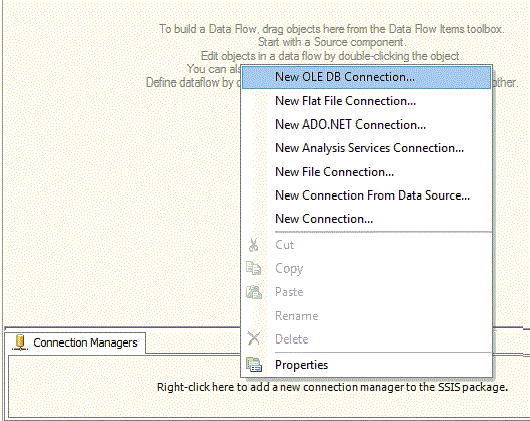
To extract these “adt” files by using SSIS package first we need a “New OLE DB Connection”.
Select “Advantage OLE DB Provider” as provider and complete folder address in “Server or file name” section. Use “adssys”  as user name and leave password blank. Don't forget to change server type value to "ads_local_server", by clicking on "ALL" button on left of connection Manager. In Initial catalog provide “adt” file name and press “Test Connection ” to test newly created connection.


Drag a new OLE DB Source

Double click “OLE DB Source” to open it in editor and provide OLE DB connection manager and name of required table.

Open properties page for “OLE DB Source” and mark TRUE to “AlwaysUseDefaultCodePage

Now you are ready to import data from OLE DB Source to any type of destination. You can provide OLE DB Destination to insert data directly into a SQL Server database. In this demo we have use Flat File as destination.

Thursday, April 7, 2011

SSIS: Opportunity to Learn SQL Server Integration


If you had never used SSIS before, and want to learn it with an easy and quick way, Andy Leonard, has started a new Stairway to SSIS series for you. With simple, step by step and easy to understand methods, supported with all necessary screen shots, Andy has done a very good job.

Can you believe that series already have got 10000 hits with in single month.

Wednesday, December 8, 2010

SSIS: FILESTREAM Data Export And Import By Using SSIS Package


Exporting FILESTREAM (varbinary (max)) data through SSIS package from source database to FLAT FILE destination  and then loading from FLAT FILE to destination database, was a time consuming task for ME, at least. Let’s check out how I had resolved it.
 (Note: Reader must have initial information of package creation using Sql Server Integration Services)
Source/destination table is “image”, with only two columns, image_id as uniqueidentifier and image_file VARBINARY(MAX) FILESTREAM.

To extract data, I have OLE DB source, Data Conversion and Flat File Destination. Image_OLE is OLE DB source with simple select query. “SELECT image_id, image_file FROM dbo.image”. Here we need to convert image_file column as follow:

For destination select a Flat File Destination  and make following changes on “General” and “Advance” tabs

Advance Tab:

Datatype of image_file must be image[DT_IMAGE]. Here you are finished with Data Extraction. Execute this package and data will be exported to a text file at your desired location.
Let’s create one more package which will extract data from FLAT FILE source to an OLE DB destination, as follow:
Lookup is used to avoid duplicate row insertion. You can skip it. “Images” is FLAT FILE SOURCE with following necessary changes.

And on “Advance” tab

Datatype should be “Unicode text stream [DT_NTEXT]”. Use data conversion, to convert image_file data type to DT_IMAGE.

In the end provide OLE DB destination. Save your package and Execute to shift VARBINARY(MAX) data from text file to your desired database table.

Tuesday, December 7, 2010

Sql Server Integration Services: Merge Join Problem


Unwanted behavior of merge joins in SSIS
Creating a package through Sql Server Integration Services, usage of MERG JOIN is common. Merge join is used when we need to combine data from two related data sources.
Merge join can only be implemented when both data sources are in proper ORDER. Ambiguous results can be observed some time when we use sort option as follow:
1.           Right click on source ---> Select Show Advance Editor… --->Select Input and Output properties --->Click on OLEDB Source Output --->On right side change “IsSorted” to true

2.   Expend OLE Source Output --->Output Columns ---> Select your desired column --->On right side change value for “SortKeyPossition” to 1, and 2 for your next column and so on


Implement merge join and get output in your desired target (Here we will use raw file source). Here are the ambiguous results.


SOLUTION:
                Always use explicit sort operations before merge join to avoid such ambiguous results.

NOTE:  This merge join problem can be observed occasionally. Not every merge join is problematic through  normal sort (through Advance Editor) process.